

26ai Autonomous AI Lakehouse with Lock-Free Reservations
Just in time for this magical season, Oracle is giving us an Autonomous AI Lakehouse that leverages Apache Iceberg so that you can access things like Snowflake, Google BigQuery, Amazon Redshift, or Databricks. The Autonomous AI Lakehouse can read/write to Apache Iceberg. As Juan Loaiza put it at Oracle AI World, "Oracle Autonomous Data Warehouses automatically become Autonomous Data Lakehouses." (see Figure 1 below) 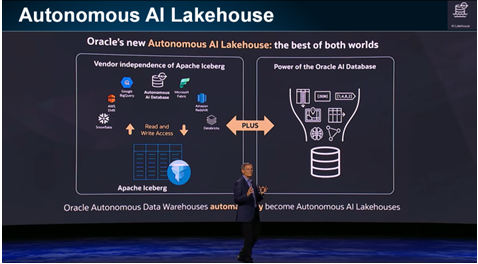
Figure 1: Oracle Autonomous AI Lakehouse with all the great features in the Oracle AI Database
This wonderful time of the year provides you with an Oracle Feature Tip that will increase performance while keeping customers and companies happy (especially consumers & merchants). We'll look at simple examples to show how easy this new 23ai Oracle Database feature is to use with the new 26ai (23.26.0.0.0) Database. My 26ai free database took just 35 seconds to start today! To upgrade to 26ai, which includes many new AI features, simply apply the October Release Update (RU).
This is not a full database upgrade, but an architecture-preserving update that adds new AI functionality (see Figure 2 below 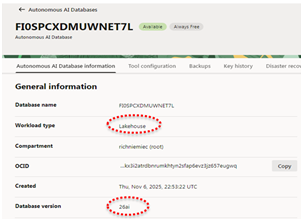 for more information, including a couple of YouTube videos that I did on 26ai that you might want to dial up). See the image on the right where I used the Oracle Autonomous AI Lakehouse on the 26ai Database. Did you know that you can get the FREE version of the 26ai Lakehouse just in time for Christmas or other holidays? Yes, FREE (could be a last-minute gift from Oracle to you)!
To prepare you for the New Year in 2026 (and your Christmas or other holiday shopping), I wanted to ensure that Lock Free Reservations in 26ai still allow more than one transaction to "lock" the same data; ok, without truly locking the data, but reserving part of it. Consider two people, both buying the exact same item, where you need to adjust the inventory amount (reserving some of it) so that you don't run out of the item. Well, if you have plenty in stock (let's say 40), and each person only wants one or even ten, you no longer need to lock the row, but you do need to RESERVE some of what's in stock just in case both people have the item in their cart. 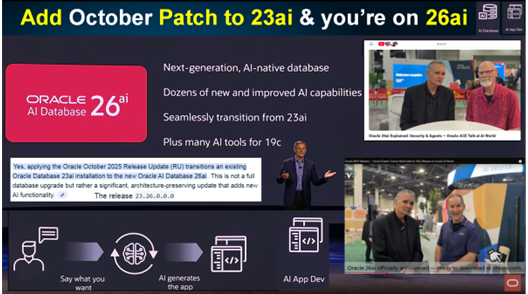
Figure 2: Oracle AI Database 26ai accelerates AI & LLMs to do AI App Dev
Lock-Free Reservation Feature Includes:
- Allowing applications to reserve part of a value in a column without locking the row. Two examples: reserve part of a bank account balance (reserve $100 of my $1000 balance) or reserve an item to purchase (1 coat reserved where there are 40 currently in stock), but without locking out all other operations on the bank account or on the item to purchase.
- Lock-free Reservation enables concurrent transactions to proceed without being blocked on updates of heavily updated rows to improve concurrency.
- Lock-free Reservations are held on the column value instead of locking the record. Lock-free Reservation verifies if the updates can succeed and defers the updates until the transaction commit time.
- In microservices applications (like trip booking services, you may have flight, hotel, and car bookings), the source remains locked for an extended period, potentially making it a hot resource. Lock-free Reservations ease this problem in the 26ai Database.
- Improved concurrency with reduced Isolation while maintaining the Atomicity, Consistency, and Durability properties of transactions (ACID Transaction). To improve concurrency, enable data locking only where the value is finally modified.
Lock-Free Reservation Basic Syntax and an Example:
- ALTER TABLE [ schema.]table [add [column_definition]]…; column_definition::= column_name datatype reservable [default <value>] [CONSTRAINT constraint_name check_constraint]
- ALTER TABLE Account ADD (Balance NUMBER reservable CONSTRAINT minimum_balance CHECK (Balance >= 50));
- Note: You must have a Primary Key on the table you use this on. Lock-free reservation is only for numeric data types (NUMBER, FLOAT, INT). You do have to change or make sure your code is an UPDATE statement on the single column defined as RESERVABLE, and that the UPDATE is only adding or subtracting (+ -) and uses the primary key (PK) in the WHERE clause. An example would be to UPDATE EMP SET SALARY=SALARY+1000 WHERE EMPNO=1; (given the EMPNO is the PK and the salary increase doesn't go higher than the constraint allows).
Syntax to change an existing column to a Reservable Column & add a Constraint (+ Example):
- ALTER TABLE [ schema.]table [modify [column_definition]]…; column_definition::= column_name reservable …
- ALTER TABLE PRODUCTS MODIFY (QOH reservable default 0 CONSTRAINT maxAmount CHECK (QOH <= 100));
Syntax to change a Reservable Column to a Non-Reservable Column (+ Example):
- ALTER TABLE [ schema.]table [modify [column_definition]]…; column_definition::= column_name not reservable]
- ALTER TABLE PRODUCTS modify (QOH not reservable);
Conventional Locking vs. Lock-Free Reservation
Now let's look at an example to show how conventional locking differs from lock-free reservations. In the following example, we want to purchase an item while maintaining a certain balance.
Conventional Locking (Long-held Locks) example to purchase $25 item while maintaining a $50 balance:
- A SELECT FOR UPDATE is first issued to read and lock the balance.
- If the balance is at least 75, the item purchase is allowed.
- The UPDATE then debits the balance.
- The transaction then commits.
- An insufficient balance causes an abort.
Lock-Free Reservation (Short-held Locks) to purchase $25 item while maintaining a $50 balance. The balance update reserves $25 without locking the record.
- If the reservation succeeds, the item purchase is allowed to proceed.
- The final commit locks the account row and applies the balance debit of $25 as recorded in the reservation.
- If the reservation fails due to insufficient funds, the update statement fails with the CHECK constraint violation.
- Multiple transactions can be reserved as long as we stay above the Minimum_Balance!
- The reservable column constraint allows the reservation to be placed on a column value without locking the row.
Lock-Free Reservation Example Code:
CREATE Table Account ( ID NUMBER PRIMARY KEY, Name VARCHAR2(10), Balance NUMBER
RESERVABLE CONSTRAINT minimum_balance CHECK (Balance >= 50));
BEGIN
-- Reserve 25 from account balance
UPDATE Account SET Balance = Balance - 25
WHERE ID = 12345;
-- If reservation succeeds, perform item purchase
PurchaseItem();
-- commit finalizes the balance update
COMMIT;
-- This finally gets the account row lock
EXCEPTION WHEN Check_Constraint_Violated
-- This indicates that the reservation failed
THEN ROLLBACK;
 END;
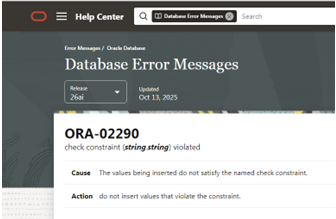
In the above script, we have an Exception. Below, I show the error in SQL*Plus. In SQL*PLUS, if you violate a check constraint, you receive the following:
ORA-02290: check constraint (ADMIN.MINIMUM_BALANCE) violated https://docs.oracle.com/error-help/db/ora-02290/ Error at Line: 7 Column: 0
If you go to the error link provided, it takes you to the Oracle Help Center for 26ai.
Reservations Are a Major Key When Using Sagas for Microservices
A saga encapsulates a long-running business transaction that is composed of several independent microservices. Consider trip booking services. You may have flights, hotels, and car bookings that all need to succeed to ensure you don't have to change them all. Well, if you hold the lock for each while completing the others, you may be out of business quickly. Using a saga will help you do this using lock-free reservations (without locking out all of the other consumers waiting for your transactions to complete).
Lock-free reservations provide in-database infrastructure for transactions operating on reservable columns to:
- Enable concurrent transactions to proceed without being blocked on updates made to reservable columns
- Issue automatic compensations for reservable updates of successful transactions in an aborted saga
In this magical tip, we saw how to reduce locking issues (most customers will only wait 0.5 to 5 seconds before leaving a transaction behind). This feature will help developers develop quicker transactions, DBAs from having to kill transactions, management from upgrading hardware, and most of all, customers will be happy just in time for Christmas and other holiday shopping!
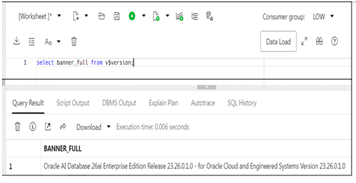 References include Oracle 23ai & 26ai Database documentation. See the Oracle website for the latest information and/or updates. The image on the left shows the version that I used on the Oracle Autonomous Lakehouse.
Lock-free reservations in Oracle 26ai make it easier than ever to handle high-demand workloads while keeping transactions fast, concurrent, and reliable, especially during peak shopping seasons. Combined with the power of the Autonomous AI Lakehouse, these features set you up for smoother operations and smarter applications heading into the new year.
Happy Holidays! 🎄
Ready to Take Your Oracle Skills to the Next Level?
Join OraPub, Viscosity’s training hub for Oracle professionals, packed with expert-led courses and exclusive paid member benefits.
Check out Viscosity’s event page for upcoming virtual and on-site training opportunities.

SUBMIT YOUR COMMENT